Using User-Based Loops in Modules
User-based loops allow you to display users dynamically within modules that support loop rendering. This is useful for building author grids, team directories, contributor lists, or any layout where user data is the primary content source.
Extended User Query Type
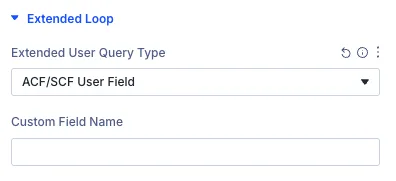
In the Extended Loop panel, you’ll find a dropdown labeled Extended User Query Type. This controls how users are retrieved for display. Options include:
- Use Current Loop Query – Uses the default query provided by Divi.
- ACF/SCF User Field – Queries users based on a custom field that stores user references, using either Advanced Custom Fields or Secure Custom Fields.
- Authors of Posts in Current Term – Displays authors who have written posts associated with the currently viewed term.
- Authors in Same Category/Taxonomy – Displays authors who share posts in the same categories or taxonomies as the current post, excluding the current post itself.
- Current Post / Term Author – Displays the specific author associated with the current post or term.
- Current Logged-In User – Displays the user account that is currently logged into the website.
Custom Field Name
When selecting ACF/SCF User Field, an input labeled Custom Field Name will appear. Enter the exact field key used to store the user reference (e.g., assigned_author or team_member).
Exclude Current User
Enable the Exclude Current User toggle to automatically omit the currently logged-in user from the query results. This is useful for contributor lists, member directories, or team grids where you want to display other users without including the person currently viewing the page.
Use Cases
- 👤 Display a list of users linked to a post (via ACF/SCF fields).
- ✍️ Showcase author grids on single posts or author archive pages.
- 👥 Build dynamic team directories or contributor lists filtered by category or taxonomy relationships.
- 🔒 Create member or colleague rosters that automatically exclude the currently logged-in user.