Using Meta Queries in Divi Loop Customization
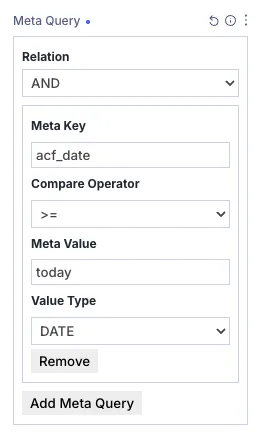
Meta Queries allow you to filter posts, terms, or users based on custom field values (post meta). This is essential for building dynamic layouts—such as showing upcoming events, filtering items by featured status, or matching results based on numeric ratings or dates.
How Meta Queries Work
Each meta query defines a condition that custom field data must meet for an item to be included in the loop. You can combine multiple meta query blocks and control how they interact using a relation operator.
1. Relation (AND / OR)
This setting determines how multiple meta query blocks are evaluated together:
- AND – All meta query clauses must be satisfied for a post to be included.
- OR – A post will be included if it satisfies at least one meta query clause.
2. Meta Key
Enter the exact custom field key stored in your database (e.g., event_date, price, featured_item, rating).
3. Compare Operator
Select the comparison rule used to match your field values:
=,!=– Equals or Not Equals.>,>=,<,<=– Greater than, Less than (numeric, alphabetical, or date comparisons).LIKE,NOT LIKE– Partial text matching.IN,NOT IN– Matches values within a comma-separated list.BETWEEN,NOT BETWEEN– Checks if a value falls within a range (e.g.,10, 50).EXISTS,NOT EXISTS– Checks if the custom field key exists on the post regardless of value.
4. Meta Value
Enter the value you want to compare against your custom field. This field supports static values, comma-separated lists for operators like IN or BETWEEN, and powerful dynamic placeholders:
- Dynamic Relative Dates: When Value Type is set to
DATEorDATETIME, anystrtotime-compatible expression automatically converts to a timezone-aware date string (e.g.,now,today,yesterday,tomorrow,+7 days,-1 month). - Context Placeholders:
{current_user_id}orcurrent_user– Dynamically uses the logged-in user's ID.{current_post_id}orcurrent_post– Dynamically uses the current post or page ID.
- Current Post Custom Fields: Use
current_post_field:CUSTOM_FIELD_NAMEor{current_post_field:CUSTOM_FIELD_NAME}to dynamically evaluate against a custom field value on the current page. - Booleans & Truthes: Keywords like
true,false,yes,no,on,offautomatically resolve to1or0.
5. Value Type
Specifies how WordPress casts and evaluates the custom field value:
- CHAR – Default text string comparison.
- NUMERIC / DECIMAL / SIGNED / UNSIGNED – Numeric comparisons (automatically casts string inputs to integer/float).
- DATE / DATETIME – Date parsing and comparison.
- BINARY / BOOLEAN – Binary or boolean flag checking.