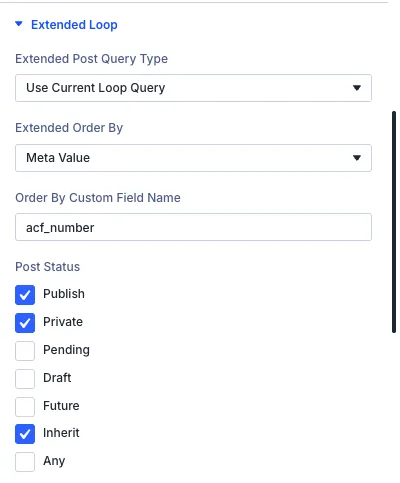
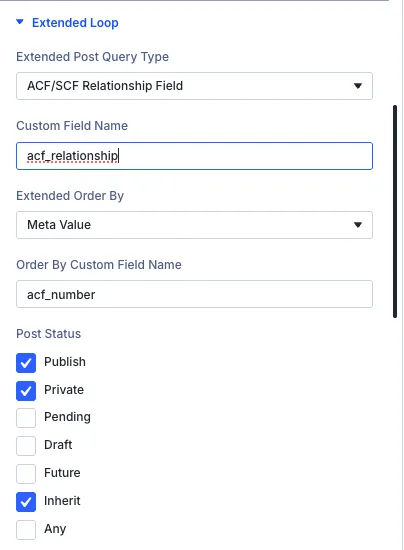
Extended Loop Panel Settings
1. Extended Post Query Type
This dropdown lets you override the default loop query behavior. Options include:
- Use Current Loop Query – Keeps the default query provided by Divi.
- ACF/SCF Relationship Field – Displays posts based on those selected in an Advanced Custom Fields or Secure Custom Fields relationship or post object field. This lets you showcase manually curated lists of related posts, products, or custom post types.
- ACF/SCF Gallery Field – Pulls image or media items directly from an Advanced Custom Fields or Secure Custom Fields gallery field. Perfect for creating dynamic photo galleries or portfolios.
- ACF/SCF Taxonomy Field – Displays posts based on categories or tags selected in an Advanced Custom Fields or Secure Custom Fields taxonomy field. This lets you filter and show posts associated with specific taxonomy terms.
- ACF/SCF User Field – Displays posts based on a user selected in an Advanced Custom Fields or Secure Custom Fields user field. This lets you feature posts linked to specific people, such as co-authors, guest contributors, or assigned team members.
- Current Page/Post Children – Displays only the direct child pages or posts of the current page. Works with standard WordPress pages and any hierarchical custom post types.
- Current Page/Post Siblings – Displays pages or posts that share the same parent as the current page. Ideal for showing related sub-pages or items within the same section.
- Current Page Author Posts – Displays posts written by the author of the currently viewed page or post.
- Current Logged-In User Posts – Displays posts created by the user who is currently logged into the website.
- Looped Term Posts – Automatically queries and displays posts associated with the current term being iterated in a parent term loop.
- Looped User Posts – Automatically queries and displays posts authored or created by the current user being iterated in a parent user loop.
- Sticky Post Only – Displays only posts that have been pinned to the top of your blog or archive.
When selecting either ACF/SCF options, an additional field labeled Custom Field Name will appear. Use this to specify the exact field key (e.g., related_posts or gallery_images) that should be used for the query.
2. Extended Order By
Controls how posts are sorted in the loop. Options include:
- Use Divi Loop Order By – Inherits the default sorting order configured in standard Divi settings.
- Meta Value – Sorts posts alphabetically or textually based on a custom field value.
- Numeric Meta Value – Sorts posts numerically based on a custom field value (e.g., price, weight, or quantity).
- Post Parent ID – Groups or orders posts by their parent page or post ID.
- Post Type – Groups and orders items by their post type (e.g., posts, pages, or custom post types).
- Relevance – Sorts search results by how closely they match the user's search query keywords.
- Menu Order – Sorts pages or posts using the manual ordering number set in WordPress page attributes or menu positions.
- WooCommerce Popularity – Sorts products by total sales numbers, showing bestsellers first.
- WooCommerce Price – Sorts products based on their product price.
- WooCommerce Rating – Sorts products by their average customer review score.
- Multiple Order By – Enables advanced sorting using multiple criteria at once (e.g., sort by WooCommerce Price first, then by Menu Order).
3. Order By Custom Field Name
When using Meta Value or Numeric Meta Value in the "Extended Order By" dropdown, this field becomes active. Enter the name of the custom field (e.g., acf_number) to define the sorting key.
4. Post Status Filters
Use checkboxes to include or exclude posts based on their status. Available options:
- Publish – Show published posts (checked by default).
- Private – Include private posts.
- Pending – Include posts awaiting review.
- Draft – Include draft posts.
- Future – Include scheduled posts.
- Inherit – Include posts with inherited status.
- Any – Include all post statuses.
5. Post MIME Type Filters
Filter attachment post types by using the MIME types allowed in WordPress.
6. Post Password Filters
Filter posts based on password protection status.
- Has Password – Toggle on to show only password-protected posts.
- Post Password – Filter posts by matching a specific post password. Enter a password value to display only posts protected by that exact password.
7. Search Keyword Filter
Filter posts dynamically using specific search terms.
- Search Keyword – Enter keywords or search terms to display only posts that match the specified query.