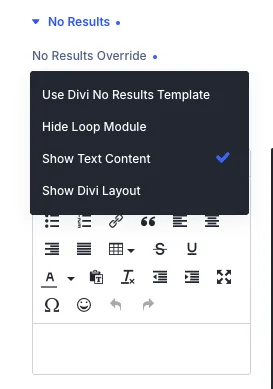
The No Results section in the Divi Extended Loop plugin gives you complete control over what happens when your query or loop returns no matching items. Instead of relying on default system outputs, you can seamlessly override the behavior to match your design requirements.
How No Results Override Works
When a query (such as a post, user, term, or relationship query) finds zero items to display, divi shows the No Results template. The No Results Override setting lets you choose precisely how the loop module behaves using four distinct display options:
- Use Divi No Results Template: Falls back to Divi’s standard system template for empty loops.
- Hide Loop Module: Completely conceals the entire loop module on the frontend when no items are found, keeping your layout clean and preventing empty spaces.
- Show Text Content: Displays custom text or HTML using an integrated WYSIWYG editor. This is ideal for showing helpful messages like "No posts found matching your criteria."
- Show Divi Layout: Allows you to select and render a custom saved Divi Library layout or section, giving you limitless design freedom to build rich empty states (including calls to action, search bars, or alternative grids).
Configuration Guide
To configure the No Results behavior in your Divi layout:
- Open the Divi Extended Loop settings.
- Scroll down and expand the No Results toggle.
- Locate the No Results Override dropdown menu.
- Select your preferred fallback behavior:
- To hide the block entirely, select Hide Loop Module.
- To display a custom notice, select Show Text Content and type your message into the text editor provided below.
- To load a pre-built design, select Show Divi Layout and choose your layout from the library selector.
- Save your changes and preview your page.
Common Use Cases
- Clean Archives & Search Results: Automatically hide empty filter results grids using Hide Loop Module so users don't see blank structural wrappers.
- User-Friendly Fallback Messages: Inform users politely when an ACF relationship field or custom filter returns no posts using Show Text Content.
- Engaging Empty States: Design a custom Divi section featuring search forms, popular categories, or a newsletter signup, and render it using Show Divi Layout when content is unavailable.