
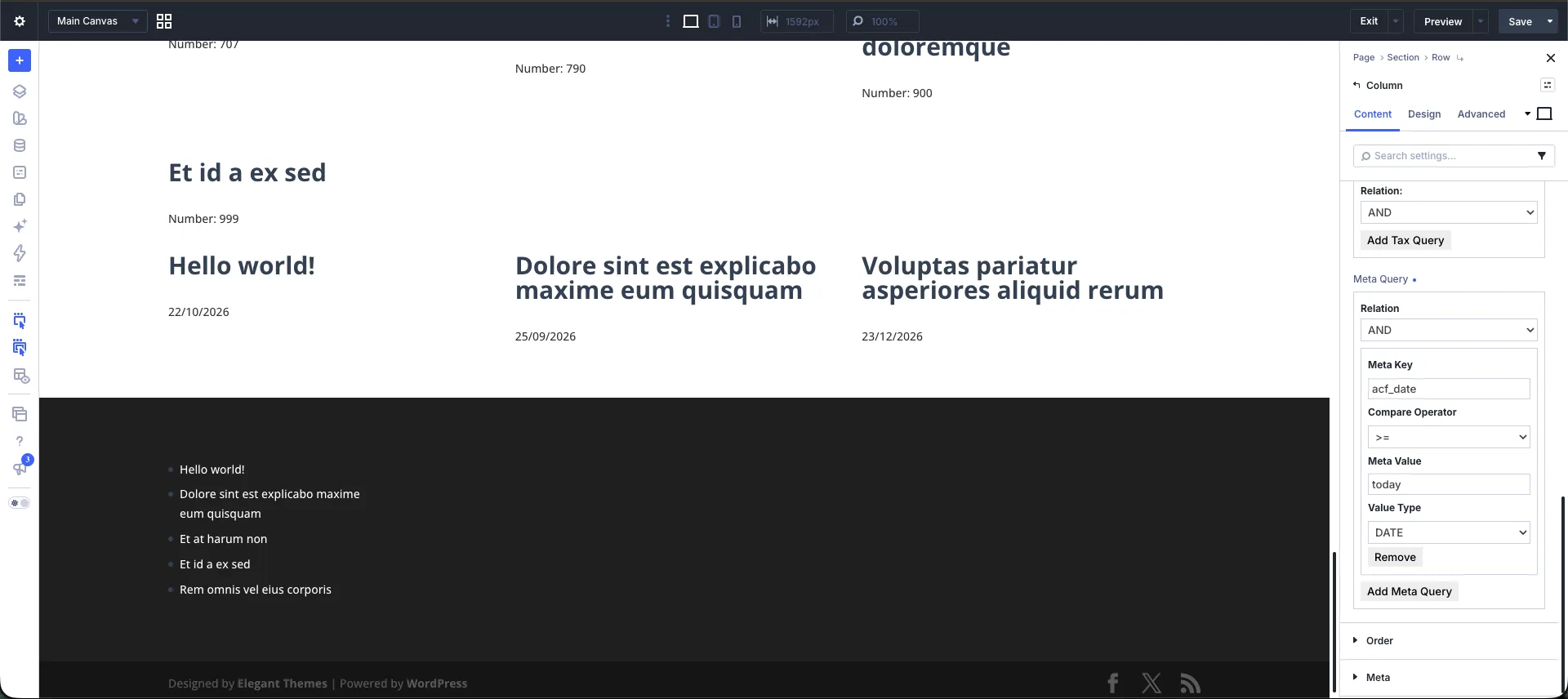
Filtering post loops in Divi 5 by custom field dates—such as showing upcoming events, expiring offers, or scheduled webinars—is seamless with Divi Extended Loop. By leveraging native date parsing and dynamic relative date expressions in the Post Meta / Custom Field Queries panel, you can filter WordPress posts dynamically without writing custom WP_Query PHP code.
Post Meta Query Parameter Quick Reference
| Parameter | Recommended Setting | Description |
|---|---|---|
| Meta Key | event_date | The database key where the custom date value is stored. |
| Value Type | DATE or DATETIME | Casting rule that forces WordPress to evaluate values chronologically instead of alphabetically. |
| Compare Operator | >=, <, BETWEEN, =, != | Logic rule used to compare the post's custom field date against your target date. |
| Meta Value | today, now, +7 days | Static date string, comma-separated range, or dynamic relative date placeholder. |
| Relation | AND or OR | Evaluates whether all query conditions must match (AND) or just one (OR). |
How to Set Up Date-Based Meta Queries in Divi 5
- Open the Extended Loop settings within the Divi 5 Builder and navigate to Meta Query section.
- Input your custom field key (e.g.,
event_date) into the Meta Key field. - Choose the appropriate Compare Operator depending on whether you are querying future, past, or bounded date ranges.
- Enter a PHP
strtotime-compatible string (such astodayornow) into the Meta Value field. - Change the Value Type dropdown from standard text string (
CHAR) toDATEorDATETIME.
Common Implementation Scenarios
How Do I Show Upcoming Events in a Divi Loop?
To display events scheduled for today or in the future, set Meta Key to your field name, Compare Operator to >=, Value Type to DATE, and Meta Value to today.
How Do I Create a Past Events Archive?
To display past events or expired content, set Meta Key to your field name, Compare Operator to <, Value Type to DATE, and Meta Value to today.
How Do I Filter Events in the Next 7 Days?
To build a rolling list of events occurring over the next week, set Meta Key to your field name, Compare Operator to BETWEEN, Value Type to DATE, and Meta Value to today, +7 days.
Dynamic Relative Date Placeholders
When Value Type is set to DATE or DATETIME, Divi Extended Loop automatically calculates timezone-aware dates using standard relative expressions:
| Placeholder Expression | Function / Output Range |
|---|---|
today / now | Matches current calendar date or real-time timestamp |
tomorrow / yesterday | Matches exact adjacent calendar day boundaries |
+7 days / +1 month | Calculates future rolling timeframes from the current moment |
-30 days | Calculates past rolling date windows |
first day of this month | Sets boundary to start of the current month |
last day of this month | Sets boundary to end of the current month |
Best Practices for ACF & Custom Field Dates
- Database Storage Format: Ensure your custom field plugin (such as Advanced Custom Fields or Meta Box) saves date values in standard SQL format (
YYYY-MM-DDorYYYY-MM-DD HH:MM:SS) to guarantee accurate chronological filtering across month boundaries and leap years. - Context Field Placeholders: Pass dynamic page context using
current_post_field:CUSTOM_FIELD_NAMEin the Meta Value field to compare loop post dates against custom fields assigned to the active parent page.
Read documentation here
0 Comments