Using Term-Based Loops in Divi Modules
Term-based loops allow you to dynamically display taxonomy terms—such as categories, tags, or custom taxonomies—within Divi modules that support loop rendering. This is especially useful for building term grids, filter menus, or taxonomy-driven navigation components.
Extended Term Query Type
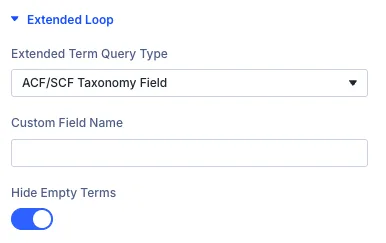
In the Extended Loop panel, you’ll find a dropdown labeled Extended Term Query Type. This controls how taxonomy terms are retrieved for display. Options include:
- Use Current Loop Query – Uses the default query provided by Divi.
- ACF/SCF Taxonomy Field – Queries terms from a custom field that stores taxonomy references, using either Advanced Custom Fields or Secure Custom Fields.
- Current Term Children – Retrieves the child terms directly beneath the current term in the hierarchy.
- Current Term Siblings – Retrieves terms that share the same parent as the current term.
- Current Term Direct Parent – Retrieves only the immediate parent term of the current term.
- Current Term All Ancestors – Retrieves all parent, grandparent, and higher-level ancestor terms leading up to the root.
- Current Post Terms – Retrieves all terms from the current post page.
- Top Level Terms (Root) – Retrieves only top-level terms that do not have a parent (root terms).
- Most Used Terms (By Count) – Retrieves terms ordered by popularity according to the number of posts associated with them.
- All Terms in Current Taxonomy – Retrieves all available terms within the currently active taxonomy.
Custom Field Name
When selecting ACF/SCF Taxonomy Field, an input labeled Custom Field Name will appear. Enter the exact field key used to store the taxonomy reference (e.g., related_categories or portfolio_tags).
Hide Empty Terms
Enable the Hide Empty Terms toggle to exclude terms that have no associated posts. This helps keep your layout clean and relevant, especially when using dynamic term grids.
Remove Current Term
Enable the Remove Current Terms toggle to automatically exclude the currently viewed term from being displayed in the loop. This is especially useful on archive or detail pages where you want to show related or sibling categories without duplicating the term you are currently looking at.
Use Cases
- 🗂️ Display a grid of categories linked to a specific post or page.
- 🔖 Show tags or custom taxonomies stored in ACF fields for filtering or navigation.
- 📁 Build dynamic term menus based on user-defined relationships.
- 🗂️ Build dynamic category navigation widgets that automatically list child or sibling terms on single category archives or detail pages.
- 🌳 Generate breadcrumb-style or hierarchical tree menus showcasing all ancestor terms leading back to the root level.
- ⭐ Highlight popular taxonomy sections by displaying the most used terms sorted by post count.
- 🧭 Create root-level directory grids to showcase main parent categories across the entire taxonomy.