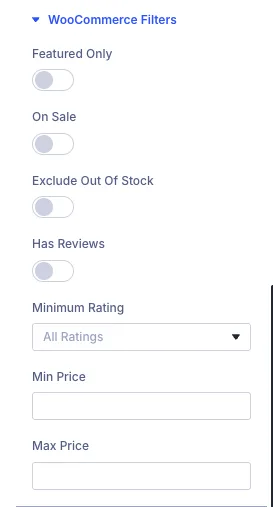
The WooCommerce Filters section in the Divi Extended Loop plugin enables powerful, targeted product queries for online stores. It allows you to filter and display products dynamically based on store-specific attributes, stock status, ratings, and pricing parameters.
How WooCommerce Filters Work
When building custom shop pages, product grids, or related item carousels with Divi, standard loops often lack fine-grained eCommerce filtering controls. The WooCommerce Filters toggle provides specific product query parameters that you can enable or configure instantly:
- Featured Only: Restricts the query to display only products marked as featured in WooCommerce.
- On Sale: Filters products to show only those currently listed at a sale price.
- Exclude Out Of Stock: Automatically hides products that are out of stock, ensuring customers only see available items.
- Has Reviews: Filters products to display only items that have received customer reviews.
- Minimum Rating: Narrows down product results based on a specified star rating threshold (e.g., filtering for top-rated items).
- Min Price & Max Price: Sets custom numerical price boundaries to display products within a specific budget range.
Configuration Guide
To set up WooCommerce filters in your Divi layout:
- Open the Divi Extended Loop module settings.
- Navigate to the query settings and expand the WooCommerce Filters toggle.
- Toggle on the specific eCommerce rules you want to apply (such as On Sale or Exclude Out Of Stock).
- Set your desired thresholds for Minimum Rating or input numeric values for Min Price and Max Price if applicable.
- Save your changes and preview your shop layout.
Common Use Cases
- Special Promotion Grids: Instantly create a "Flash Sale" section on your homepage by enabling the On Sale filter.
- In-Stock Product Catalogs: Prevent customer friction by filtering out unavailable inventory using Exclude Out Of Stock.
- Curated Price Brackets: Build dedicated landing pages for budget-friendly items by configuring precise Min Price and Max Price parameters.